Talk to our experts
TLDR :
Salesforce Classic lacks new features and security updates. Lightning Experience offers Einstein AI, Kanban boards, up to 50% faster performance, and over 2,000 enhancements for greater efficiency.
Migration roadmap (4-6 months): 1) Readiness check/inventory. 2) Rebuild customs. 3) Phased rollout by team. 4) Training/support for 95% adoption.
Ranosys, a Salesforce Summit Partner, manages the full process to avoid common issues like data errors or user resistance, ensuring smooth results.
Your Salesforce investment is one of the most critical business decisions. If you are currently operating on Salesforce Classic, a platform that has likely served your organization well over the years, but it has now become a legacy system. Salesforce Classic does not receive feature updates and has now become outdated, less intuitive, and very costly to maintain.
That said, as your business evolves, your workforce becomes more distributed and mobile, and as customer expectations shift, you need to modernize your platform too. If you are exploring Salesforce Lightning, you are on the right track. Organizations across industries are considering moving to align their CRM platform with how businesses operate today.
This guide is designed for those who want to understand whether Salesforce Lightning migration makes strategic sense for your organization, what’s involved, and how to execute it successfully. We will be straightforward about both the advantages of modernization and the realistic effort required to make the transition.
What is the Salesforce Lightning Experience?
Before diving into Salesforce Classic to Lightning migration specifics, let’s discuss Salesforce Classic first:
Salesforce Classic was the original interface that powered Salesforce for over a decade. Launched in the mid 2000s, Salesforce Classic became a trusted backbone for thousands of organizations worldwide. Its tab-based, hierarchical interface was revolutionary for its time, providing a structured way for teams to manage customer relationships. Many organizations built entire business processes around Salesforce Classic, and it continues to serve its purpose for those who rely on it. For organizations with straightforward CRM needs and desktop-centric teams, Salesforce Classic delivered consistent, dependable performance.
Now, let’s understand the importance of Salesforce Lightning.
In 2015, Salesforce introduced the Salesforce Lightning Experience, a modern user interface and application framework, built to complement and extend the capabilities that made Salesforce Classic a trusted CRM platform for thousands of organizations. Salesforce built Lightning with a different approach, with component-based architecture, visual-first design, and mobile-first principles.
Think of Lightning as the next chapter of the Salesforce journey. It builds on Classic’s proven architecture while introducing new capabilities and a redesigned interaction model optimized for today’s work environment.
The introduction of Salesforce Lightning didn’t make Salesforce Classic immediately obsolete; it created a new path forward. Both interfaces coexisted for years, allowing organizations to transition at their own pace.
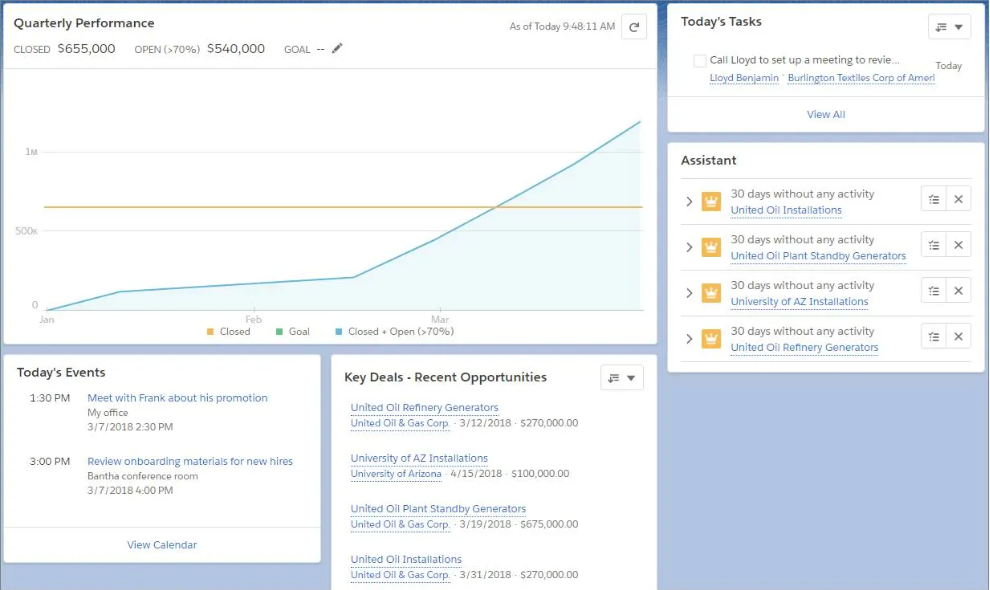
Key components and features:
Lightning App Builder: A drag-and-drop tool that allows administrators and business users, without developer involvement, to build and customize applications and pages. You can create role-specific experiences for sales, service, operations, and executives in minutes, not in weeks.
Sales Path and Kanban View: Lightning exclusive visualization tools that transform how teams manage their pipeline:
- Sales path shows at a glance where each record stands in your sales process, with success guidance embedded for each stage. Reps can advance deals or retreat if circumstances change, all with one click.
- Kanban view displays opportunities as movable cards organized by stage. Field teams can drag opportunities between columns to update status, while managers get a complete visual pipeline overview in seconds
Lightning Dialer: Integrated calling directly from Salesforce. Reps click a phone number, the system auto logs the call, pulls up the related record, and captures notes, eliminating the manual data entry and post-call administrative work. In practice, this saves 5-10 hours per rep per week.
Activity Timeline: A consolidated view of all activities, calls, tasks, meetings, and notes for every customer. No more navigating multiple screens to understand interaction history.
Einstein AI integration: Salesforce’s AI is embedded throughout Lightning:
- Lead Scoring: Identifies your highest value prospects before your team does
- Opportunity Insights: Predicts close probability and recommends next steps
- Activity Capture: Automatically logs emails and meetings, eliminating manual entry
- Predictive Forecasting: Flags at-risk deals before they slip away
Advanced Dashboards and Reports: Lightning report builder enables real-time, interactive dashboards with filters, row-level formulas, and visual analytics that illuminate business trends at a glance, far superior to Classic’s static reports.
Enhanced security with Lightning Locker: Component-level security isolation, stronger multi-factor authentication (MFA), and role-based permissions that exceed Classic’s capabilities.
Mobile First Responsiveness: Fully responsive design that adapts to any device size. Field teams work offline, with automatic synchronization when reconnected. Push notifications alert reps to time-sensitive opportunities and customer issues.
AppExchange Integration: 300+ prebuilt Lightning components and 500+ apps that extend CRM functionalities. 89% of the Fortune 100 use AppExchange apps to manage customer operations at scale.
Salesforce Classic vs Lightning Experience: Key Differences
Understanding the specific gaps between classic and Lightning is essential for your migration strategy. Here’s a detailed breakdown:
| Business Dimension | Salesforce Classic | Salesforce Lightning |
| User Interface | Text-heavy, tab-based, desktop-centric | Modern, visually intuitive, component-based |
| Navigation Model | Tab navigation requires multiple clicks | App-based, streamlined utility bar |
| Mobile Capability | Limited mobile access, unreliable offline sync | Mobile-first, fully responsive, offline sync |
| Pipeline Visualization | List views require custom reporting | Native Kanban boards, Sales Path, and visual staging |
| Page Load Speed | 40–50% slower, especially with large datasets | 50% faster through optimized architecture |
| AI & Insights | Minimal Einstein integration | Full Einstein Analytics: lead scoring, opportunity insights, activity capture, forecasting |
| Customization | Limited drag-and-drop, requires developer involvement | Extensive Lightning App Builder, admins build without coding |
| Automation | Workflow Rules and Process Builder (end-of-support Dec 2025) | Advanced Salesforce Flow with record triggers, scheduled flows, and user-initiated flows |
| Reporting & Analytics | Static reports, limited interactivity | Dynamic, interactive reports with row-level formulas, real-time dashboards |
| Security | Basic MFA, standard permissions | Lightning Locker component isolation, enhanced MFA, Shield encryption add-on |
| Activity Management | Scattered across multiple sections | Unified Activity Timeline capturing all interactions |
| Third-Party Integration | Limited, often requires custom development | 500+ AppExchange apps, REST/SOAP/GraphQL APIs, Change Data Capture |
| Strategic Innovation | No new features in the development pipeline | Continuous innovation (new features every release) |
| End-of-Life Status | Approaching sunset; security updates only | Actively supported, ongoing development |
Why migrate from Salesforce Classic to Lightning?
For years, Salesforce Classic was the standard interface that enterprises relied on for their CRM operations. That changed in 2016 when Salesforce introduced Salesforce Lightning as its next-generation platform. Then, they rolled out a new and improved interface for Salesforce Lightning. It has a refreshed UI that focuses on displaying the information in a visually appealing way. But in 2026, the Salesforce Classic to Lightning migration is more of a necessity. Here’s why migration from Salesforce Classic is crucial:
- Stop accumulating technical debt: Every extra day you delay the Salesforce migration from Classic to Lightning migration, you are accumulating technical debt. If you are still on the Classic version, your teams are still creating customizations, reports, workflows, and automations on top of the system that Salesforce no longer updates. And when you finally decide to migrate Salesforce Classic to Lightning, all of those Classic-based setups may need to be rebuilt or replaced, ultimately adding time, cost, and complexity to the migration. So basically, you are falling behind while others innovate.
- You are missing out on 2000+ features and innovations: There are as many as 2000 features that are available with the Lightning version. All the innovation happens in Salesforce Lightning, like Salespath for guided selling, Lightning App Builder for no-code customization, Activity Timeline, Kanban views, advanced reporting, and Einstein Analytics, which exists only in Lightning. By staying on Classic, you are constrained from accessing competitive advantages your competitors may already be leveraging.
- Your AppExchange ecosystem is shrinking and limiting your options: AppExchange allows users to access a marketplace of pre-built Salesforce applications that extend Salesforce functionalities without custom development. However, this ecosystem is very Lightning-exclusive. It is very costly for AppExchange partners to support both versions, so most now offer updates and features rollout for Lightning users only. If you stay on the Classic version, you won’t have access to the extensive ecosystem of third-party solutions, integrations, and extensions that power modern Salesforce implementations. Lightning users benefit from 300+ components and 500+ apps in the AppExchange.
- Lower development cost and faster implementation through configuration: This is often surprising to organizations that assume migration will be expensive. Over time, Classic’s reliance on custom code and Visualforce pages creates ongoing maintenance overhead. Every customization is a potential point of failure. Lightning’s configuration-over-code approach reduces this complexity. Organizations report 43% reduction in development cost by building solutions on Lightning from the start. The Lightning App Builder makes it simple to customize pages by rearranging components with clicks instead of code. Lightning Web Components (LWC) enable developers to build rich applications with less code, reusing components across projects.
- Access to AI and Intelligent automation that your competitors are already using: Einstein Analytics is a powerful AI-driven tool that provides users with clear insights into their Salesforce environment. It simplifies sales and marketing forecasting, offering advanced analytics to help teams make more informed decisions. Lead scoring and Opportunity scoring help prioritize work. Activity capture automatically logs emails and calls. Predictive insights guide decision-making. These capabilities exist exclusively in Lightning. Einstein AI helps predict which deals will close, which customers might churn, or which leads have the highest conversion probability.
We help you tackle migration challenges with our proven expertise.
Pre-migration checklist for Salesforce Classic to Lightning migration
Before committing resources to Salesforce Classic to Lightning migration, establish your baseline. Salesforce provides a Lightning Experience Readiness Check – a diagnostic tool that scans your organization for Salesforce Lightning compatibility issues, unsupported features, and integration risk.
1. Conduct a Salesforce Lightning readiness check
This Salesforce Lightning readiness check tool is essential for identifying Salesforce Lightning compatibility issues early:
- Which customizations, Visualforce pages, and workflows are incompatible with Lightning
- Which integrations may require updates
- Whether your custom code will need rebuilding or refactoring
- Adoption risk factors based on your user base and feature usage
Running this Salesforce Lightning readiness report should be your first step. It transforms abstract migration concerns into a concrete, prioritized action list and is foundational to all successful Salesforce Lightning implementation projects.
2. Conduct a Workflow Inventory
Map your critical workflows:
- Which objects and fields do users interact with daily?
- Which custom applications are business-critical?
- What third-party integrations exist, and which apps depend on Classic features?
- Where does your team rely on custom code vs. standard Salesforce features?
This inventory allows you to understand scope and complexity upfront critical inputs for timeline and budget planning.
3. Establish Governance & Champions
Designate:
- Executive Sponsor: Someone at the C-suite who can champion the initiative, remove blockers, and sustain momentum through the 4–6 month Salesforce Lightning migration window.
- Migration Champions: Department leads or super-users who’ll champion Salesforce Lightning adoption within their teams. These people should be involved early and trained deeply they’re your advocates.
- Technical Lead: Someone who understands your org’s architecture, custom code, and integrations.
Change management research is unambiguous: migrations led by champions (super-users) outperform those driven purely by IT or training teams. People trust peers more than they trust mandates.
4. Build a Communications Plan
Define how you’ll communicate the “why” to your organization:
- Why are we migrating? (Opportunity framing: innovation, productivity, future-proofing—not “Salesforce is forcing us”)
- What’s in it for end-users? (Easier to use, faster to get information, mobile works better)
- What’s the timeline? (Be realistic; better to under-promise and over-deliver)
- What support will be available? (Training, FAQs, helpdesk coverage)
Organizations that communicate early and often see 15–20% higher adoption rates than those that treat migration as a surprise
Step-by-step Salesforce Classic to Lightning migration process
Successful Salesforce Classic to Lightning migrations follow a structured approach. This reduces risk, allows for course correction, and builds confidence with end-users.
Phase 1: Planning
Goals: Define scope, build governance, assess readiness.
- Run the Salesforce Lightning readiness check and document findings.
- Create the workflow and customization inventory.
- Define success metrics: adoption target (e.g., 95% of users actively using Lightning 30 days post-launch), productivity gains to track, and support ticket trends.
- Build your project governance: sponsor, champions, technical lead, and communication owner.
- Create a detailed Salesforce Lightning migration roadmap with realistic timelines and Salesforce Lightning migration steps.
Planning discipline is the strongest predictor of Salesforce Lightning upgrade success. Organizations that rush this phase experience more post-launch issues.
Phase 2: Sandbox Testing & Modernization
Goals: Validate that customizations work in Lightning; identify gaps; modernize code.
- Migrate a clone of your production org to a sandbox and enable Salesforce Lightning Experience.
- Test all critical workflows, integrations, and custom applications.
- Document any functionality gaps or issues. For each gap, decide: rebuild, workaround, or retire?
- Modernize Visualforce pages to Lightning Web Components (LWC) where possible.
- Update integrations and third-party app dependencies.
Conduct user acceptance testing (UAT) with department representatives.
This phase is the truth-telling phase. Issues found here are cheap to fix. Issues found post-launch are expensive and damage confidence. Take the time to test thoroughly.
Phase 3: Phased Rollout by Department
Goals: Minimize disruption; learn from early waves; build momentum.
Rather than a big-bang cutover, perform Classic to Lightning migration by department or business unit (Waves 1–3, typically):
- Wave 1: A pilot group (often Sales or a single region). Use this to validate your training, support processes, and issue resolution playbooks.
- Wave 2: Expand to related departments. Incorporate feedback and improvements from Wave 1.
- Wave 3: Complete rollout. By now, your support team has refined their approach and can scale with confidence.
A wave-based rollout strategy extends your overall timeline compared to a full cutover, but the risk reduction is substantial. Teams that migrate by department experience 40% fewer critical production issues post-go-live and achieve adoption rates 30% higher than organizations that migrate their entire user base simultaneously.
During this phase, keep Classic available as a fallback for users who need it. This reduces fear and allows users to transition at a reasonable pace.
Phase 4: Sustained Optimization
Goals: Monitor adoption; refine processes; sustain momentum.
- Track adoption metrics weekly using Salesforce’s Lightning Usage App. Monitor which users are switching back to Classic and why.
- Collect user feedback through surveys or listening sessions.
- Address friction points: unclear navigation, missing training resources, and functionality gaps.
- Celebrate wins and publicize them (productivity gains, faster response times, user satisfaction improvements).
This phase doesn’t end at go-live. Organizations that sustain focus for 90 days post-launch see Salesforce Lightning adoption rates 25% higher than those that “declare victory” and move on.
Salesforce Lightning Migration Challenges
While there are many reasons to migrate from Classic to Lightning, the migration isn’t easy. For many organizations, migrating to Lightning can be a challenging process.
- Managing Customizations During Platform Evolution: Organizations typically have years of customizations built on Classic Visualforce pages, APEX code, JavaScript buttons, and custom Workflow Rules that solve real business problems. When moving to Lightning, these customizations need evaluation. Some work fine, some need refactoring, and some no longer align with how you want to operate in Lightning. An organization with minimal customization might migrate in 6-8 weeks, but one with extensive customizations might need 4-6 months or longer. Customizations are the biggest variable affecting migration complexity and timeline.
- Organizational Change and Adoption Curves: People are creatures of habit. Salesforce Classic has been your team’s daily work environment for years. Even when Lightning is objectively better, change creates friction. Users asking “where did that button go?” or “why is it different?” is normal and expected. Poor change management leads to lower adoption rates, increased support tickets, and team frustration. Technical migration success means nothing if users don’t adopt the platform.
- Integration Compatibility and Data Flow: Salesforce doesn’t operate in isolation. Most instances connect to accounting systems, HR platforms, marketing automation tools, data warehouses, and custom applications. These integrations need to function correctly in Lightning just as they do in Classic. Integration issues can be technical (APIs need updates), timing-related (integrations depend on specific platform features), or functional (data doesn’t flow correctly). Failed integrations can disrupt critical business processes.
- Performance Expectations and User Experience: Sometimes Lightning feels different in performance compared to Classic, particularly in the first weeks post-migration. The difference might be real (optimization needed) or perception (users aren’t familiar with new interface patterns). Perception of performance problems drives user frustration and reduces adoption. If users believe the new system is slower, they’ll resist it regardless of actual performance metrics.
- Scope Management and Timeline Extensions: Migration projects naturally attract additional initiatives: “While we’re migrating, let’s also update this process,” or “We discovered we need this customization,” or “We found data quality issues we should fix.” Each addition extends the timeline. Scope creep increases costs and delays go-live dates, which creates momentum loss and compounds project costs.
- Data Integrity and Migration Completeness: Moving data and configurations between platform architectures introduces risks. Incorrect field mappings, incomplete migrations, data type mismatches, or skipped data elements can introduce inconsistencies. Data integrity issues undermine trust in the new system and create extra work post-migration to identify and fix problems.
- Training and Support Adequacy: Migration timelines are typically compressed, and training often gets squeezed. Users go live without fully understanding the new system, creating higher support demand in the critical first weeks. Without adequate training and support, organizations experience higher support ticket volume, lower adoption, frustrated users, and decreased productivity post-migration.
- Unforeseen Compatibility Issues and Surprises: Despite thorough planning and testing, things sometimes don’t work as expected in Lightning. A third-party app might have Salesforce Lightning compatibility issues. A custom field might behave differently. A critical process might rely on an undocumented workaround. Last-minute surprises derail timelines and require rapid problem-solving under pressure, which increases stress on teams and the risk of introducing new issues.
Conclusion
Migrating from Salesforce Classic to Lightning is one of the most impactful Salesforce projects an organization can undertake. Done well, it drives productivity, improves user adoption, reduces costs, and positions your organization to leverage Salesforce’s future roadmap. Done poorly, it creates frustration, diverts resources, and erodes confidence in Salesforce.
The difference between success and struggle comes down to three things: clear planning upfront, realistic timelines that account for complexity, and investment in change management and adoption.
If you’re still on Salesforce Classic, the question isn’t whether to migrate, it’s when. The longer you wait, the further behind you fall on Salesforce’s innovation roadmap, and the more technical debt you accumulate.
Salesforce Classic to Lightning migration is an investment. Like any investment, it requires upfront planning and execution discipline. But the returns in productivity, user satisfaction, and competitive capability are substantial.
How Ranosys Supports Your Salesforce Lightning Migration Journey
As a 3X award-winning Salesforce Summit partner with a strong global presence. Ranosys brings deep expertise in Salesforce Lightning implementation and enterprise data solutions. We help organizations unify, activate, and scale their Salesforce environments to unlock real-time insights and accelerate business growth.
Ranosys brings deep Salesforce expertise combined with real-world experience supporting organizations through migrations. We guide the entire journey:
- Pre-Migration Assessment: We identify customization risks, technical debt, and feature compatibility using Salesforce’s readiness tools. This gives you a clear picture of what needs to change and why, so you can plan with confidence.
- Migration Planning and Execution: We align your business processes, automation, and integrations with Lightning best practices. Rather than lifting and shifting what worked in Classic, we design your Lightning org to work the way modern teams actually operate.
- Custom Optimization: We build using Lightning App Builder, Flows, and Lightning Web Components (LWC) to improve both usability and performance. Your team gets tools tailored to how they work, not tools they have to adapt to.
- Multi-Cloud Expertise: Our proficiency spans Sales Cloud, Service Cloud, Marketing Cloud, Commerce Cloud, and MuleSoft, ensuring your Data Cloud implementation aligns seamlessly with your wider Salesforce ecosystem.
- Ongoing Support and Managed Services: We continuously enhance performance, security, and scalability as Salesforce evolves. Your investment in Lightning doesn’t end at go-live; it grows stronger over time.
We’ve guided organizations across industries like financial services, healthcare, manufacturing, and professional services through successful migrations. We know the patterns, we know where risks hide, and we know how to help your organization navigate the transition so you emerge with a platform that truly accelerates your business.

Kali Charan Rajput
AVP of Marketing & Growth
Kali Charan Rajput is AVP of Marketing & Growth at Ranosys, a Salesforce Summit Partner, where he leads demand generation and thought leadership initiatives across the Salesforce ecosystem. With 15+ years of experience in digital marketing, branding, and B2B growth, he has supported enterprise organizations in driving large-scale digital transformation and commerce programs across global markets. Connect with him on LinkedIn.