Retail email campaigns average open rates of 18% to 25%, according to Mailchimp’s 2025 Email Marketing Benchmarks. For CTOs and heads of digital at retail organizations, that number represents a structural problem: the majority of your customers are not seeing the messages your team spent time and budget building. Extending your Salesforce Marketing Cloud WhatsApp integration closes that gap by delivering personalized, automated messages on the channel customers check most.

You’ve invested in Salesforce Marketing Cloud. Your journeys are mapped, your segmentation is solid, and your customer data is structured. But when the campaign fires, it lands in an inbox customers check twice a day, if at all. The issue is not the strategy; it’s the delivery channel. Your messages are competing with hundreds of other promotional emails, while your customers are actively engaged on a messaging platform your brand isn’t using yet.

This is where connecting Salesforce Marketing Cloud to WhatsApp changes the equation: it puts the customer data and journey logic you’ve already built to work on the channel where customers are most responsive.

What the Salesforce Marketing Cloud WhatsApp Integration Does

Salesforce Marketing Cloud supports two distinct WhatsApp message types within Journey Builder, each serving a different purpose in the customer lifecycle.

Template messages are outbound, business-initiated messages that must be pre-approved by Meta before sending. These are used for transactional and marketing communications: order confirmations, cart recovery, loyalty alerts, and back-in-stock notifications. Templates are created in Content Builder using AMPscript and personalization tags, then submitted for Meta approval before they can be activated in a journey. Once approved, only the variable fields within a template can be edited.

Session messages are responses to customer-initiated conversations. When a customer sends your brand a WhatsApp message, a 24-hour response window opens during which your team or an automated journey can reply without a pre-approved template. In Journey Builder, a “Wait for Chat Response” decision step handles this window and allows retailers to branch the journey based on how a customer responds, enabling two-way, conversational experiences directly within an automated flow.

Both message types use Super Messages, which is how Salesforce allocates quota for WhatsApp activity. Super Message costs vary by region and by whether the message is outbound or part of a chat session, so planning usage before go-live is important for cost management.

High-Impact Use Cases for Retail Teams

High-Impact Use Cases for Retail Teams


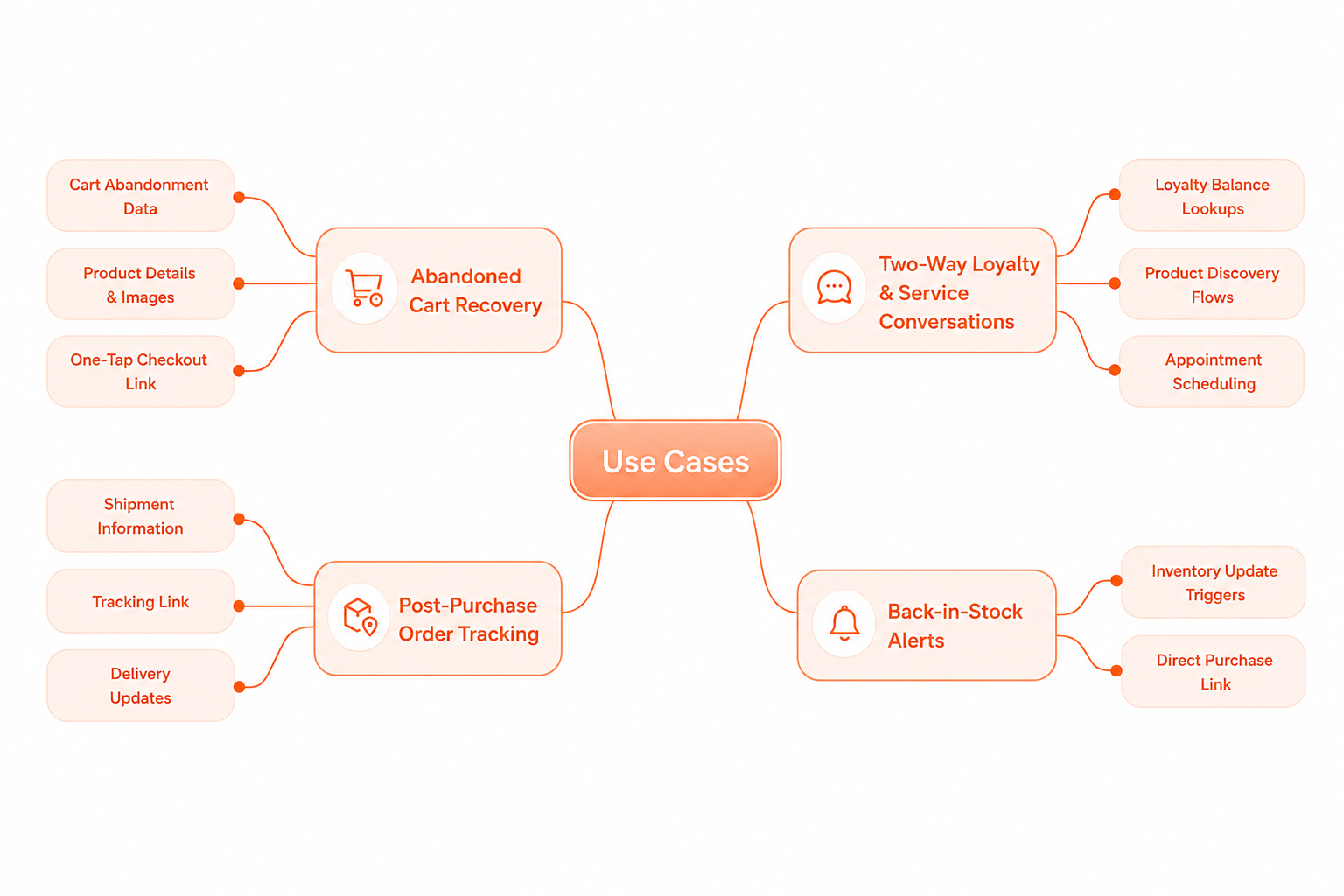
Abandoned Cart Recovery

Cart abandonment is one of the most consistent sources of lost revenue in retail ecommerce. A WhatsApp template message triggered within 30 to 60 minutes of abandonment, carrying the exact product name, image, and a one-tap link back to checkout, reaches the shopper in an environment far less congested than email. Because the message uses personalization variables populated from your Marketing Cloud data extension, every recovery message reflects the individual customer’s session, not a generic prompt.

Rutland Cycling, a UK-based retailer with 14 stores, implemented Salesforce Marketing Cloud to manage post-purchase notifications, order updates, and dispatch communications over WhatsApp, reducing inbound customer service volume while improving satisfaction scores across their omnichannel operation.

Post-Purchase Order Tracking

Salesforce Trailhead documentation confirms that a straightforward way to implement shipment notifications is to create a one-step journey using a data extension that holds order and shipping information, then configure a WhatsApp template message activity to trigger when shipment status updates. Customers receive dispatch confirmation, courier tracking links, and delivery notification as sequential WhatsApp messages, without ever needing to search their inbox or call support.

Two-Way Loyalty and Service Conversations

Session messages open a genuinely different engagement model for retail brands. A customer who scans a QR code in-store or taps a WhatsApp link embedded in an SMS or email initiates a conversation, triggering an inbound chat journey entry in Marketing Cloud. From there, Journey Builder can respond with keyword-triggered session messages: product discovery flows, loyalty balance lookups, or appointment scheduling. This is where the integration moves beyond broadcast messaging into conversational commerce at scale.

Back-in-Stock Alerts

A customer who opted in to a restock notification has already signaled purchase intent. When inventory status updates in your connected commerce platform, a WhatsApp template message fires automatically with the product image and a direct purchase link. For fashion and lifestyle retailers managing seasonal drops and limited inventory, this use case converts high-intent shoppers who would otherwise be lost to a generic email they may not open for days.

Common Challenges and How the Integration Addresses Them

Challenge Business Impact How the Integration Resolves It
Low email open rates across retail campaigns Campaigns reach less than a quarter of the intended audience. WhatsApp messages reach customers in an environment they check frequently, significantly increasing message visibility.
Cart abandonment without timely recovery High-intent shoppers leave without converting and are expensive to retarget. Behavior-triggered WhatsApp messages within 30 to 60 minutes reach shoppers while purchase intent is still active.
High inbound service volume for order status Customer service teams absorb avoidable queries that drain capacity. Automated WhatsApp post-purchase sequences deliver proactive updates before customers need to ask.


What Teams Need to Get Right Before Go-Live

Three areas require preparation before messaging begins at scale.

Consent and opt-in collection. WhatsApp Business Platform requires explicit opt-in from every customer. Retailers need to embed consent capture into purchase confirmation flows, loyalty registration pages, and account creation screens, with opt-in data stored in Marketing Cloud’s data extensions to drive journey eligibility.

Message template approval. All WhatsApp messages sent at scale require pre-approved templates reviewed by Meta. Template approval typically takes 24 to 72 hours, so building the template library across all planned use cases before launch prevents delays at go-live.

BSP configuration and data mapping. The connection between Salesforce Marketing Cloud and WhatsApp Business Platform runs through a WhatsApp Business Solution Provider (BSP). Validating data mapping between Commerce Cloud order objects and Marketing Cloud before launch ensures that messages display accurate product names, order numbers, and loyalty balances from day one.

Why Ranosys for Salesforce Marketing Cloud WhatsApp Integration

As a 3X Salesforce Partner of the Year and Summit Partner, Ranosys has delivered Salesforce Marketing Cloud implementations for retail brands including Victoria’s Secret, Rituals, Charles & Keith, Bath & Body Works, and Rutland Cycling. Our team handles the full implementation scope: BSP configuration, consent framework design, Journey Builder architecture, template strategy, and data mapping with Salesforce Commerce Cloud and OMS.

If your retail organization is ready to extend its Marketing Cloud investment to the channel where customers respond, speak to our Salesforce team to plan your WhatsApp integration roadmap.

Drive cart recovery, loyalty, and conversions through WhatsApp automation