Talk to our experts
Adobe Commerce has given enterprises a powerful foundation for building scalable, deeply customized digital storefronts for years. Its flexibility and rich feature set helped businesses create commerce experiences that matched the complexity of their operations and the expectations of their customers.
But as digital commerce has matured, so has the operational weight that comes with it.
Managing a traditional Adobe Commerce deployment requires ongoing attention to version upgrades, security patches, and infrastructure configuration. For teams running high-traffic, high-SKU storefronts, this maintenance cycle competes directly with the time and resources needed to ship new capabilities. The challenge is not the platform’s power; it is the overhead of keeping it running at the pace that modern commerce demands.
That is where Adobe Commerce as a Cloud Service (ACCS) comes in. This blog covers how ACCS differs from your current setup, whether your business is ready to migrate, and the step-by-step Adobe Commerce to ACCS migration process your team needs to plan for.
What Is Adobe Commerce as a Cloud Service (ACCS)?
Adobe Commerce as a Cloud Service is Adobe’s fully managed, versionless SaaS commerce platform. According to Adobe’s official documentation, ACCS offers flexibility, scalability, and efficiency by enabling businesses to deliver and rapidly scale digital operations while accelerating innovation, with cloud-native infrastructure that automatically adjusts to meet peak demands for traffic, orders, and catalog management.
Four core product areas power ACCS:
- Commerce Storefront: A high-performance storefront powered by Adobe Commerce Edge Delivery Services
- Merchandising Services: Catalog management, Live Search, and Product Recommendations
- Product Visuals: Digital asset management integrated with Adobe Experience Manager
- Developer Platform: App Builder, API Mesh, Events, and Webhooks for out-of-process customization
The fundamental change from your current setup: Adobe manages the core application and infrastructure. Your team focuses on business capability, not maintenance.
Adobe Commerce Cloud vs Adobe Commerce as a Cloud Service: What Actually Changes
The Adobe Commerce PaaS to SaaS migration is not a version upgrade. It is a full platform re-architecture. Here is what that means in practice:
| Dimension | Adobe Commerce Cloud (PaaS) | Adobe Commerce as a Cloud Service (ACCS) |
| Upgrade Management | Major version upgrades, security patches, and maintenance are managed by your team. | Adobe delivers continuous updates, with changes available for validation in a sandbox before production. |
| Customization Model | Customizations are built directly into the application using PHP modules and theme overrides. | Custom business logic is implemented using App Builder, API Mesh, and other out-of-process services. |
| Storefront Experience | Supports Luma, PWA Studio, and headless storefronts. | Uses Commerce Storefront powered by Edge Delivery Services; Luma storefronts are not supported. |
| Extensions | Extensions run within the core application. | Extensions are redesigned as API-driven, out-of-process applications. |
| Infrastructure Management | Infrastructure responsibilities are shared between Adobe and your team. | Adobe fully manages infrastructure, scalability, security, and platform operations. |
| Scalability | Scaling infrastructure requires planning and operational management. | Automatically scales to support fluctuations in traffic, orders, and catalog size. |
| Innovation & Feature Delivery | New capabilities are often delayed until platform upgrades are completed. | Continuous feature releases enable faster adoption of new Adobe Commerce capabilities. |
| Best Fit | Organizations with highly customized deployments that require extensive control over the platform. | Businesses looking to reduce operational overhead, accelerate innovation, and adopt a modern SaaS commerce platform. |
For teams that have spent years managing upgrade cycles and infrastructure, this is a meaningful operational change, not just a platform one.
Why Businesses Are Moving to Adobe Commerce as a Cloud Service
The conversation around Adobe Commerce modernization usually starts with one frustration: too much engineering time spent keeping the lights on. Here is what ACCS concretely changes:
Upgrade cycles stop being a project. Major version upgrades in the PaaS model require backups, compatibility checks, and code conflict resolution before any new capability ships. In ACCS, Adobe applies updates continuously and notifies merchants in advance, giving your team 30 days to evaluate changes in the sandbox before they go live.
Infrastructure scales on its own. ACCS infrastructure adjusts automatically to handle peak traffic and order volumes. Your team is not managing this; Adobe is.
Adobe Experience Cloud works together. ACCS connects natively with AEM Assets, Adobe Analytics, and Adobe Target, so your commerce and experience tools share the same data foundation.
Operational overhead drops. When patching, upgrading, and infrastructure management move off your team’s plate, that capacity returns to work on the business that actually needs to be done.
Is Your Business Ready for an ACCS Implementation?
Before committing to ACCS migration for enterprise ecommerce, four areas of your current environment need honest assessment:
Your customizations. How many custom modules, theme overrides, and business logic modifications has your team built? Each needs evaluation before migration. Some will have direct equivalents; others will need rebuilding in a different way.
Your extensions. Third-party extensions running inside your Commerce core do not carry over directly. Some will have compatible alternatives; others require rebuilding.
Your integrations. Every system connected to your store, whether ERP, CRM, OMS, payment gateway, or shipping provider, needs a re-evaluated connection plan. The integration method changes in ACCS.
Your storefront. Luma storefronts require a full rebuild on Commerce Storefront powered by Edge Delivery Services. PWA Studio storefronts can be migrated or maintained. Headless storefronts are not affected.
The more customizations and integrations your store carries, the more a phased approach makes sense over a full cutover.
Common Adobe Commerce Cloud to ACCS Migration Scenarios
ACCS supports three paths. The right one depends on your complexity, team capacity, and how much transition your operations can absorb.
Full migration moves all data, customizations, and integrations at once. This works well for merchants with fewer customizations who want a faster, cleaner transition to the Adobe Commerce SaaS platform.
Incremental migration moves everything in stages while your existing platform stays live. This is the preferred path for larger merchants with significant customization and data complexity.
Commerce Optimizer-based migration uses Adobe Commerce Optimizer as a stepping stone, giving merchants access to Merchandising Services, Commerce Storefront powered by Edge Delivery, and Product Visuals powered by AEM Assets while the full Adobe Commerce Cloud replatforming continues at a controlled pace in the background.
Step-by-Step Adobe Commerce as a Cloud Service Migration Process
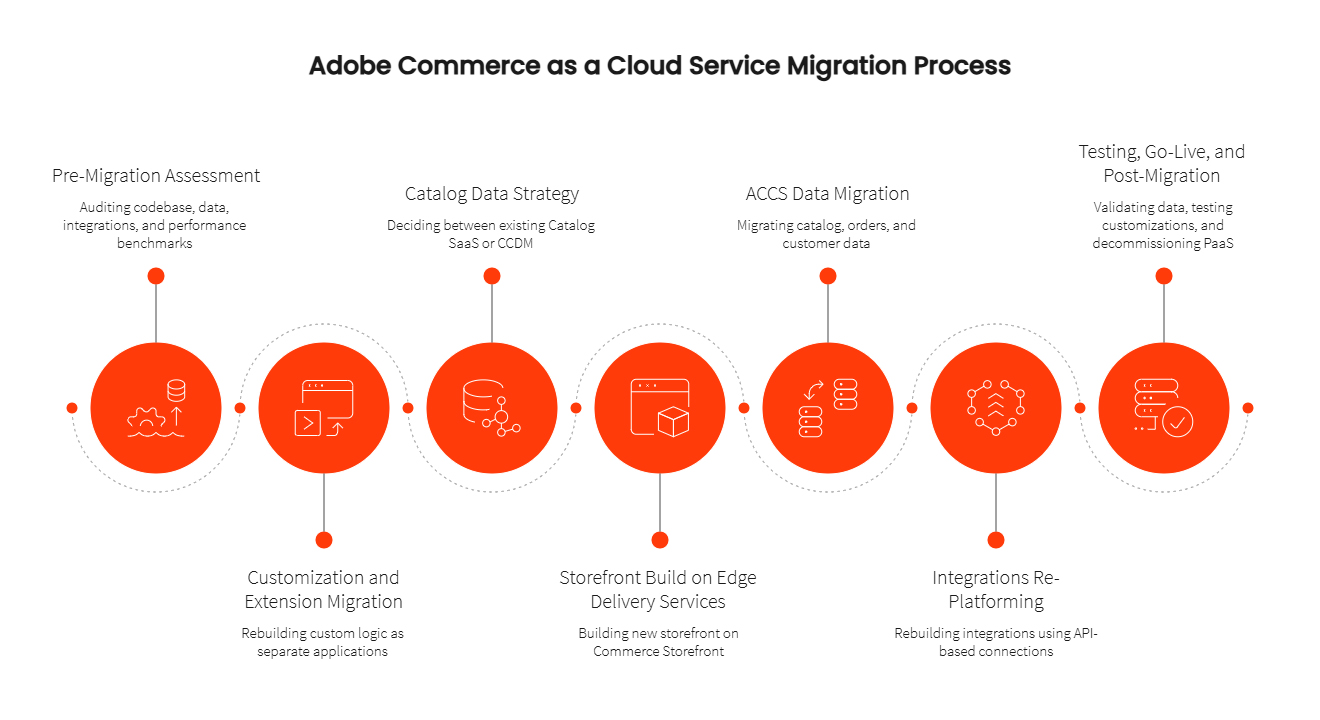
Here is how to migrate from Adobe Commerce Cloud to Adobe Commerce as a Cloud Service. The process runs across seven structured phases, from pre-migration assessment through go-live and post-migration operations. Each phase has dependencies on the one before it, so the sequence matters as much as the individual steps:
Step 1: Pre-Migration Assessment
Your team or ACCS implementation partner audits your codebase (custom modules, overrides, deprecated functionality), data (database size, quality, import/export processes), integrations (every external system and how it connects), and current performance benchmarks. Security configurations including WAF rules and IP allowlists are also documented here, since they need to be re-established. This step defines your migration path, priorities, and whether your team needs training before build work begins.
Step 2: Customization and Extension Migration
Everything that currently runs inside your Commerce core needs to move outside it. Custom business logic, pricing rules, order processing rules, tax calculations, and address validations are rebuilt as separate applications that connect back through APIs. This step takes the most time for heavily customized stores and sets the foundation for how maintainable your store will be going forward.
Step 3: Catalog Data Strategy
Before the storefront can be built, your catalog data pipeline needs to be established. Two approaches are available: continuing with your existing Catalog SaaS service (fed from your current PaaS backend), or adopting the Composable Catalog Data Model (CCDM), Adobe’s architecture for multi-source catalog data that powers AI-driven Live Search and Product Recommendations. This decision shapes how your storefront consumes product data and needs to be made early.
Step 4: Storefront Build on Adobe Commerce Edge Delivery Services
If you are migrating from Luma, this step involves building your new storefront on Commerce Storefront powered by Adobe Commerce Edge Delivery Services. Adobe provides accelerators to reduce build time. Existing static content, such as pages and marketing banners, is migrated into AEM Services. For incremental migrations, the new storefront also needs a plan for handing cart and checkout back to your existing platform during the transition period.
Step 5: ACCS Data Migration (Catalog, Orders, Customers)
ACCS data migration covering catalog, orders, and customers is handled through Adobe’s Bulk Data Migration Tool. Before any data moves, clean your source database: deduplication and validation on your existing PaaS data should happen before bulk migration begins. For incremental migrations, an iterative sync process keeps the new environment current with ongoing changes from your live PaaS instance throughout the transition.
Step 6: Integrations Re-Platforming
Every existing integration needs to be rebuilt using Adobe’s Integration Starter Kit or the Adobe Commerce as a Cloud Service REST API. Custom scripts connecting directly to your database are not compatible with ACCS and must be replaced with API-based connections. This step covers ERP, CRM, OMS, payment gateways, and shipping providers.
Step 7: Testing, Go-Live, and Post-Migration
Before cutover, validate all migrated data against source records, test all rebuilt customizations end-to-end, verify integration data flows, and run performance tests. Confirm Lighthouse scores against the baseline from Step 1, then plan your DNS cutover carefully. After the validation period post-launch, your existing PaaS environment is decommissioned, and your team moves into ACCS’s ongoing versionless development workflow.
ACCS Migration Checklist
Assessment:
- Codebase audit completed (custom modules, overrides, deprecated code documented)
- Extension compatibility reviewed; rebuild list defined
- All integrations listed with re-platforming strategy defined
- Database quality assessed; cleanup plan in place
- Performance baseline documented (Lighthouse scores, load times)
- Security configurations reviewed (WAF rules, IP allowlists)
- Storefront type confirmed and migration path selected
- Catalog data strategy decided (existing Catalog SaaS or CCDM)
- Migration scope defined (full, incremental, or Commerce Optimizer-based)
Build and migration:
- Customizations rebuilt and tested outside the core platform
- Catalog data pipeline established and validated
- Storefront built on Edge Delivery Services; static content migrated
- All integrations re-platformed using Adobe’s Integration Starter Kit
- Data cleaned, bulk migration executed, and validated against source records
- Iterative data sync in place (for incremental migrations)
Pre-go-live:
- End-to-end testing completed across all critical workflows
- Performance benchmarks validated against pre-migration baseline
- DNS cutover plan documented
- Post-launch monitoring configured
- PaaS decommissioning plan in place for after the validation period
Why Choose Ranosys for Adobe Commerce as a Cloud Service Migration?
An Adobe Commerce Cloud migration to ACCS runs several workstreams at the same time: assessment, customization rebuild, storefront development, data migration, and integration re-platforming. A gap in any one of them creates delays across the rest.
As an Adobe Solution Partner, Ranosys has delivered Adobe Commerce migration services across retail, BFSI, and enterprise B2B environments. Here is what we bring to your migration:
- Migration readiness assessment across codebase, data, integrations, and security
- Catalog data strategy guidance (existing Catalog SaaS vs. CCDM)
- Customization and extension rebuild outside the core platform
- Storefront development on Edge Delivery Services, including content migration
- Bulk and iterative data migration, validated against source records
- Integration re-platforming for ERP, CRM, OMS, and payment systems
- Post-go-live support, monitoring, and PaaS decommissioning
Our approach keeps your existing platform live throughout the migration so your operations continue without disruption while the new environment is built and validated.
Ready to Migrate to Adobe Commerce as a Cloud Service?
Adobe Commerce as a Cloud Service is a full platform re-architecture. Teams that approach it with a structured plan, the right migration path, and an experienced partner complete it on schedule and without operational disruption.
If you are evaluating an Adobe Commerce SaaS migration or want to understand what your specific environment would require, our team can run a readiness assessment with no obligation.
Talk to our ACCS migration experts to map your current setup against the ACCS model and build a migration plan that fits your timeline and business requirements.