Talk to our experts
Slack started as an internal communication tool inside a gaming company in 2012. By the time Salesforce acquired it in 2021, it had become the default operating layer for enterprise teams globally, handling everything from sales deal discussions to IT incident response. Over the years, each major capability added to Slack, threaded messages, app integrations, Slack Connect, Canvas, and AI summaries, extended the same core idea: bring more of the work into the place where conversations happen.
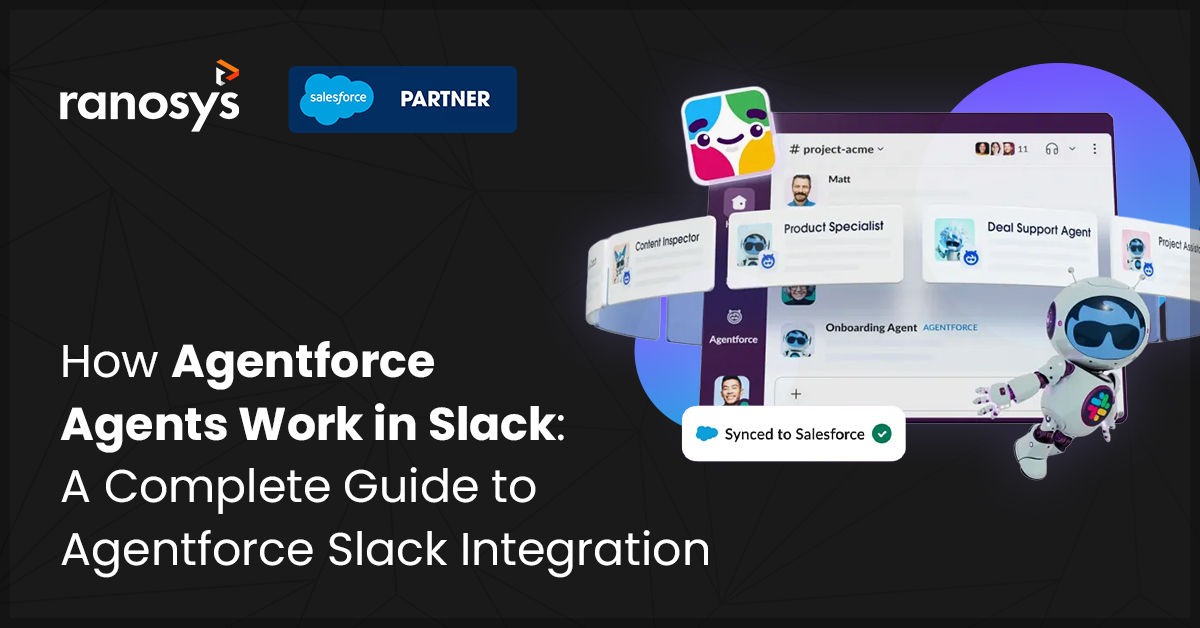
Agentforce’s integration into Slack in May 2025, and its formal positioning as the agentic OS of the Agentforce 360 platform in October 2025, is the most significant of those extensions yet. Rather than surfacing information passively, Agentforce agents in Slack agents can now query Salesforce CRM records, execute multi-step actions, route approvals, and proactively alert teams, directly inside the Slack threads where decisions are made.
For enterprise teams already running both platforms, this integration raises a set of practical questions: How does an agent actually behave inside a Slack thread? What can it do autonomously versus what requires human approval? What does your team need to configure before it works as intended?
This guide answers those questions in full. You will come away understanding the four-layer architecture behind the integration, the step-by-step interaction flow from trigger to response, the highest-value use cases for sales and service teams, and the deployment considerations that separate a successful rollout from one that stalls.
What is Agentforce?
Agentforce is Salesforce’s autonomous AI agent platform, built to take multi-step actions on behalf of users across CRM data, business workflows, and connected systems. Unlike Einstein Copilot, which responds to user prompts as an assistant, Agentforce agents operate proactively: they monitor data, interpret context, and execute actions with minimal human intervention, inside the tools where work is actually happening.
The Salesforce Agentforce features available through Slack go beyond assistance into autonomous execution, which is what makes the integration architecturally significant rather than just convenient.
Why Slack is becoming the AI gateway
For many enterprises, Slack has become the main system of engagement: the place where conversations, decisions, and handoffs happen across sales, service, product, and operations. Salesforce describes Slack as an agentic surface, where humans, agents, and data come together in one interface instead of in separate dashboards. It is the natural place for conversational AI in Slack because it is already where people spend their time and attention.
At the same time, workers are moving ahead with AI on their own. The 2025 Slack Workforce Index shows that AI adoption among desk workers has risen 50% since November 2024, with 60% now using AI and 40% using AI agents. Daily usage is 233% higher than 6 months earlier, and daily AI users are 64% more likely to report very good productivity and 81% more likely to report very high job satisfaction. That means your team will use AI somewhere, but the question is whether they use it inside governed Salesforce Slack AI-powered systems or outside them.
The issue is the split between communications and systems of record. All the conversations happen in Slack, while Salesforce holds the account, opportunity, and case data that your organization trusts. When someone needs data and information, they have to copy and paste the information across tools,chase updates before meetings, and rely on screenshots and they end up getting distracted from the work they were supposed to do in the first place. Agentforce agents in Slack aim to fix this by letting AI agents use Salesforce data and take actions directly from the place where conversations happen.
Capgemini’s TechnoVision 2026 report frames the broader shift: chat is the new super app, with AI-augmented platforms like Slack transforming a familiar messaging interface into a unified operating layer for the enterprise.
The problem has never been where decisions are made. It has been that the CRM data informing those decisions lives one system away. Agentforce agents in Slack resolve that by bringing Salesforce’s intelligence directly into the conversation.
How Agentforce integrates with Slack
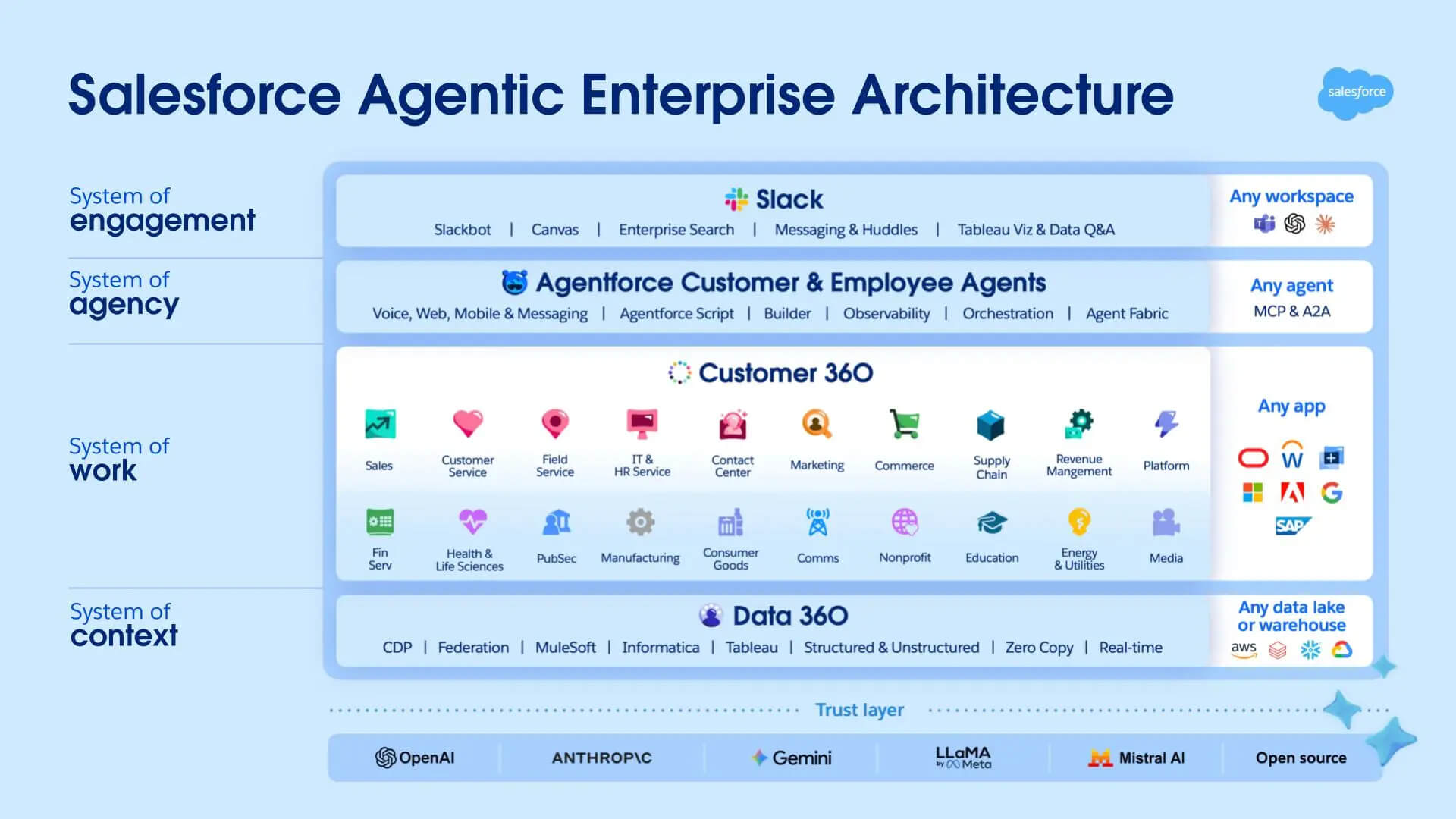
Understanding how Agentforce works inside Slack and how it integrates with Slack starts with understanding its architecture first. There are 4 layers in the Salesforce agentic enterprise architecture, and Slack sits on the top as the primary surface where humans and agents meet, rather than a communication tool existing alongside your enterprise applications. Each of the 4 layers serves a distinct role in the system:
- Slack – surfaces the conversation ( System of engagement)
- Agentforce – processes intent and orchestrates actions (System of agency)
- Customer 360 – provides the CRM records, opportunities, cases, and account data that the agent queries (System of work)
- Data 360 – supplies the broader contextual layer underpinning the agent’s reasoning. Together, they form a connected system where a question asked in a Slack thread can reach live Salesforce data and return a structured, actionable response, without the user ever switching tools (System of context).
No layer works in isolation; each depends on the others to complete the response.
The configuration layer that governs how agents behave lives in Agent Builder, where you define topics (what the agent handles), actions (what it can do), and guardrails (what requires human approval). The Salesforce Slack AI Agent interface for users in Slack is Slackbot, launched as a full AI agent in January 2026. Unlike tools that require users to paste in background context with every prompt, Slackbot draws on ambient Slack context it has already indexed: channel history, files, canvases, and connected Salesforce data.
Two additional capabilities extend thisAgentforce Slack integration significantly. Salesforce data fields in Canvas, released in January 2026, allow live, bi-directionally synced Salesforce data to be embedded directly inside Slack Canvases, viewable and editable in-place under Salesforce-governed permissions. New Salesforce channel automations, also released in January 2026, allow manually created Salesforce channels to automatically trigger setup actions including adding users, posting messages, and attaching relevant canvases, reducing the manual configuration overhead that previously slowed Agentforce rollouts.
Triggers can be user-initiated, meaning a rep types a question in a channel, or system-initiated, meaning a Salesforce record change fires a proactive notification directly into Slack.
Step-by-Step: How Agentforce agents in Slack work
This section addresses a specific question enterprise teams ask before committing to deployment: what does the actual Slack AI workflow look like, from the moment a user asks a question to the moment an action is taken?
Step 1: User Triggers the Agent in Slack
A rep types a question in a channel where Slackbot is active, for example: “@Slackbot, summarize the renewal status for Acme Corp.” The agent receives this as a natural language input inside the existing thread. Alternatively, the rep can access Slackbot through the agent sunroof, a dedicated panel in the Slack interface where agents can be added, removed, and accessed without leaving the current workspace.
Step 2: Agent Interprets Intent Using a Tools-in-a-Loop Pattern
Agentforce maps the request to a configured topic using its reasoning layer. It identifies which Salesforce objects are relevant: the account record, open opportunities, recent service cases. The agent calls the required tools in parallel where possible, feeds the results back into its reasoning loop, and repeats until it has enough context to respond accurately. This is conversational AI in Slack operating at the CRM data layer, not just the messaging layer.
Step 3: Agent Queries Salesforce Through Connected Data Sources
The agent pulls live data from Customer 360 using MCP (Model Context Protocol), the open standard that gives agents a standardized way to discover and connect to data sources across an organization’s stack, without requiring custom point-to-point integrations for every tool. As of March 2026, Slack’s MCP server is generally available, enabling Salesforce AI agents in Slack and other AI assistants to use Slack tools including search, messaging, and Canvas creation.
Step 4: Agent Determines the Autonomy Threshold
For read-only tasks like surfacing a deal summary or pulling a metric, the agent responds directly. For write actions such as updating a field, advancing an opportunity stage, or triggering an external communication, the agent checks whether the configured guardrail requires human approval before proceeding. This is where agentic AI Salesforce governance matters: clear boundaries defined in Agent Builder determine what the agent handles versus what it escalates.
Step 5: Agent Surfaces Interactive Action Buttons In-Thread (Where Required)
If approval is required, the agent does not just notify. It suspends execution and delivers an interactive message in the Slack thread with buttons such as “Approve,” “Decline,” or “Draft email.” Clicking a button automatically sends the corresponding prompt back to the agent, so the rep continues the Agentforce automation Slack workflow without typing a follow-up or switching tools. Only after confirmation does the agent proceed and sync the result back to Salesforce.
Step 6: Agent Responds in Thread
The final output lands in the existing conversation as a structured response. The full cycle typically completes in seconds. The rep never left the thread.
Key use cases of Agentforce agents in Slack
Sales pipeline updates: The agent pulls current opportunity status, stage, and next steps from Salesforce and posts a deal brief into the channel on demand or on a defined schedule. Sales managers gain live pipeline visibility without running a manual report.
- Case escalation routing: When a support case hits a defined threshold (priority level, SLA breach, customer tier), the agent posts an alert into the assigned Slack channel and tags the responsible team member, moving the case forward without manual intervention.
- Meeting prep briefs: Before a discovery or renewal call, the agent compiles a summary from the account record, contact history, and open opportunities and delivers it to the rep’s DM. Because Slackbot has indexed prior conversations and connected Salesforce data, the brief reflects current state without any manual input from the rep.
- Live CRM data in Canvases: Sales and service teams can embed live Salesforce data fields directly into Slack Canvases. Account health, pipeline stage, case status, and custom fields display in-canvas and sync bi-directionally, keeping the working document and the CRM record in step.
- Approval workflows with interactive buttons: The agent surfaces approval requests in Slack with action buttons such as “Approve” and “Decline.” Managers act directly in the thread; decisions sync to Salesforce without a separate login.
- AI-powered notifications and proactive CRM alerts: The agent monitors Salesforce for defined trigger conditions, such as a deal at risk, an approaching renewal date, or a reopened high-priority case, and sends AI-powered notifications to the relevant team in Slack before they need to ask.
- Multi-agent coordination via A2A: For complex requests spanning multiple systems, the A2A (Agent-to-Agent) protocol lets specialized agents coordinate behind the scenes. A single Slack prompt can trigger a CRM agent, a data analytics agent, and a summarization agent working in sequence, delivering one consolidated response to the user.
Benefits of Using Agentforce with Slack
1. More selling time, less administrative drag
The Salesforce 2026 State of Sales report found that sellers expect Agentforce automation Slack workflows to cut prospect research time by 34% and email drafting by 36%. When Agentforce surfaces account context through Slackbot, reps stop switching systems for information lookups and redirect that time to the conversations that move deals forward. The administrative bottleneck, not the rep’s effort or skill, is what limits output.
2. Faster case resolution without escalation delays
Salesforce’s 2025 State of Service report found that AI-assisted service reps spend 20% less time on routine cases, freeing approximately four hours per week for more complex work. With Salesforce AI agents in Slack handling escalation routing and surfacing case context in Slack, service teams act on current information faster, in the platform where they collaborate.
A mid-market B2B software company deployed Agentforce agents into their Slack service channels, reducing average case escalation response time by 38% in the first quarter post-deployment.
3. CRM data quality that keeps pace with the conversation
One of the persistent data quality problems in Salesforce is late or missed field updates, because reps resolve issues verbally in Slack and never return to the CRM to document them. With Salesforce data fields now available inside Slack Canvases, and Slackbot able to prompt for record updates in-thread after human confirmation, both the documentation layer and the CRM layer stay current without adding a separate step to the rep’s workflow. This is CRM automation that works with how people actually communicate, not against it.
4. Adoption visibility for IT and operations leaders
For IT Directors and operations teams evaluating the rollout, Slackbot now includes a dedicated analytics dashboard tracking AI adoption and usage trends across the organization. This means deployment decisions can be grounded in actual usage data: which teams are using agents, which use cases are generating the most activity, and where adoption gaps exist before they become organizational problems.
5. Consistent process execution at scale
Gartner predicts that 40% of enterprise applications will include task-specific AI agents by the end of 2026, up from less than 5% in 2025. Teams that deploy agentic AI Salesforce workflows now build the operational foundation that others will be catching up to later. Because Agentforce enforces the same routing and approval logic regardless of volume or time zone, process consistency stops depending on individual effort or availability.
Challenges & Considerations before you deploy
Planning for the practical challenges of Agentic AI Salesforce agents in Slack helps you avoid surprises during rollout.
| Challenge | Business impact | Mitigation |
| Data governance and access control | If agents can read or surface more data than they should, you risk compliance issues and loss of trust. | Align agents with existing Salesforce permission sets and Slack workspace rules, start with low-risk topics, and review logs and early outputs as part of a pilot. |
| Agent guardrails and answer quality | Vague instructions can lead to inconsistent answers or actions that do not match your policies. | Invest time in writing topic instructions, define when agents must ask for approval, and refine prompts based on feedback from early users. |
| Slack workspace and channel design | If agents appear in too many channels or the wrong ones, noise increases and ownership becomes unclear. | Decide which workspaces and channels will use agents, document recommended patterns, and roll out in phases with clear owners. |
| User adoption and training | Without examples and basic training, people may underuse agents or rely on them for the wrong tasks. | Run enablement sessions, share prompt examples and short videos, and highlight early internal success stories that show specific wins. |
Agentforce vs Traditional Slack Automation
Many organizations already use custom bots, Salesforce Flow, or low-code workflow tools. Salesforce Agentforce features extend this pattern rather than replacing it outright. The distinction matters when making a build-vs-buy or upgrade decision.
| Feature / Capability | Traditional Slack Bots & Flows | Agentforce Agents |
| Autonomy Level | Rule-based; responds only to exact triggers | Reasoning-based; interprets natural language using a tools-in-a-loop pattern |
| CRM Data Access | Requires a custom API build to query Salesforce | Native Customer 360 connection via MCP; no bespoke integration per tool |
| Multi-Step Reasoning | Cannot chain actions based on context | Executes multi-step workflows; supports cross-agent coordination via A2A |
| Context Retention | Each trigger is stateless | Draws on ambient context such as channel history, files, canvases, and connected Salesforce data |
| Natural language understanding | Expect specific syntax, buttons, or menus | Accept plain-language questions and follow-ups, similar to normal channel conversations |
| Approval Interaction | Passive notifications requiring users to act elsewhere | Interactive buttons delivered inline in the thread; one click continues the workflow |
| Setup Complexity | Low for simple notifications; high for complex branching logic | Moderate; requires Agent Builder configuration, permission mapping, and guardrail definition |
How Ranosys Implements Agentforce Agents in Slack
Ranosys is a certified Salesforce implementation partner with experience configuring and deploying Agentforce automation Slack workflows across enterprise and mid-market organizations. Unlike generalist integrators, our team works across the full Salesforce platform stack, meaning the agent topics, guardrails, and CRM data structures we configure reflect how your Salesforce org actually operates, not a generic template.
Our implementation process covers the full deployment lifecycle:
- Discovery and Use Case Mapping: Identify the highest-value Slack AI workflows for agent automation based on your sales and service operations
- Agentforce Configuration: Build agent topics, actions, and guardrails in Agent Builder aligned to your CRM architecture and the four-layer model
- Slack Integration Setup: Connect agents to relevant channels, configure the Salesforce Slack AI Agent (Slackbot), set up Salesforce data fields in Canvas, and align permission structures with IT and compliance requirements
- Testing and Guardrails: Validate agent behavior before production, with documented boundaries for autonomous versus human-approved actions
- Training and Enablement: Prepare reps, admins, and managers to work effectively with agents from day one
- Ongoing Optimization: Use Slackbot analytics to monitor adoption, refine agent topics, and expand use cases as your team’s confidence with agentic AI Salesforce grows.

Kavita Saini
Senior System Analyst
Kavita Saini is a Senior System Analyst at Ranosys, a Salesforce Summit Partner, where she architects scalable Salesforce solutions for enterprise businesses across industries. With 11+ years of experience and 19+ Salesforce certifications, she specializes in Salesforce B2B Commerce, Sales Cloud, Service Cloud, Experience Cloud, OMS, CPQ, integrations, and solution architecture. She has helped global enterprises streamline complex business processes and build high-performance Salesforce ecosystems that drive efficiency and growth. Connect with her on LinkedIn.